
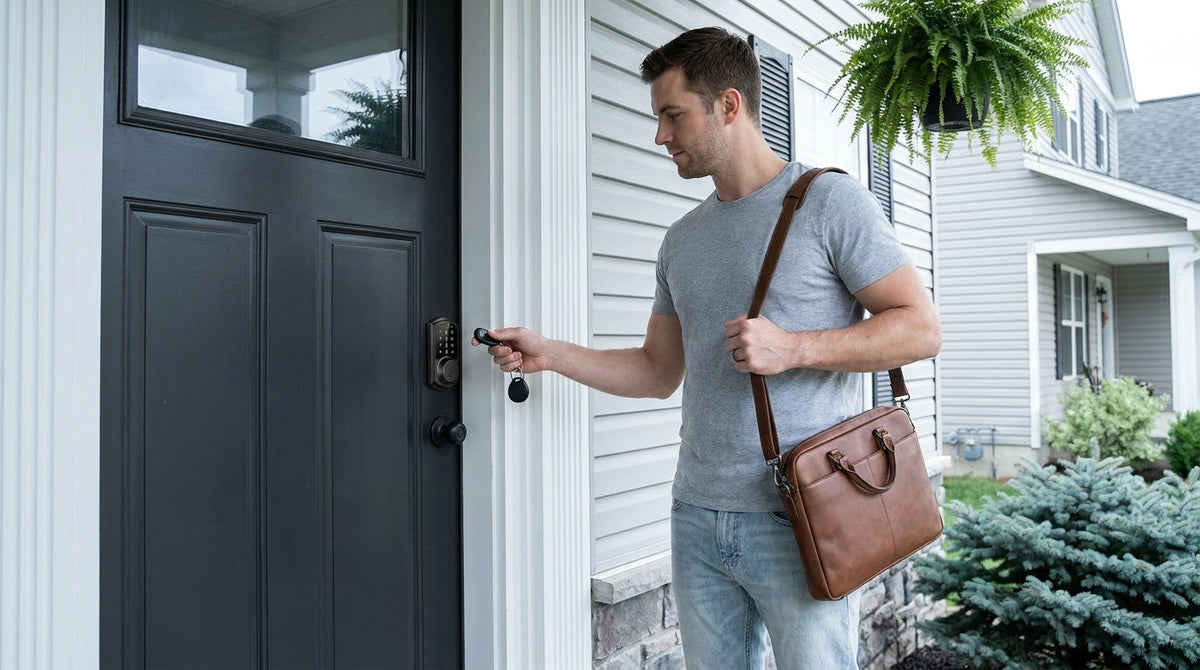
You walk up to your front door, hands full of groceries, and tap a small fob against the lock. One soft click later, you're inside — no digging for keys, no fumbling with a keypad. That's NFC door lock technology doing exactly what it was built to do: make entry fast, secure, and frictionless.
Near-Field Communication (NFC) is the same short-range wireless technology that powers tap-to-pay at checkout. When it's built into a residential smart lock, it lets a small, passive token — usually a key fob — communicate with the lock in a fraction of a second to confirm identity and release the bolt. The tech has been in smartphones and hotel key cards for years; now it's in the deadbolt on your front door.
This guide breaks down how NFC door locks actually work, explains the difference between NFC and RFID (they're related, but not the same), and walks through the practical benefits and real limitations for homeowners. You'll also find specific guidance on how Veise's lineup of smart locks puts NFC and key fob access to work — so you can pick the right lock for your home, your family, and your budget.
What Is NFC — and Why Does It Matter for Door Locks?
NFC stands for Near-Field Communication. It's a short-range wireless protocol that allows two devices to exchange data when they're within a few centimeters of each other — typically 1 to 4 inches. That tight range is intentional: it means accidental triggers are nearly impossible, and a would-be eavesdropper would have to be practically touching the lock to intercept a signal.
In the context of smart door locks, NFC technology allows a lock to "read" a nearby authorized token — a key fob, an access card, or in some cases an NFC-enabled smartphone — and respond by releasing the deadbolt. The exchange takes milliseconds. From the user's perspective, it feels instant: tap and enter. There's no typing, no app to open, no Wi-Fi dependency. The lock handles the entire authentication locally, on-device.
That local-first design is part of what makes NFC access so reliable as a backup method. Smart locks increasingly offer multiple ways to get in, and NFC or RFID key fob access sits alongside fingerprint scanning, keypad codes, physical key, and app control as one of the most dependable fallbacks — especially when a phone battery is dead or a family member doesn't want to deal with a code.
NFC vs. RFID: What's the Difference?
These two terms get used interchangeably in product listings, and that's understandable — NFC is technically a subset of RFID. Both use radio waves to transmit identification data between a credential (a card or fob) and a reader. But they differ in meaningful ways, and knowing the difference helps you understand exactly what your lock is doing.
RFID (Radio Frequency Identification) is the broader technology. It uses electromagnetic waves to communicate between a reader and a passive tag or chip. RFID operates at several frequency bands; the lower-frequency variants (around 125 kHz) are common in older hotel key cards and basic fobs, while higher-frequency variants (13.56 MHz) power more modern access systems. RFID communication is generally one-way: the card or fob broadcasts its ID, and the reader decides whether to grant access.
NFC operates at 13.56 MHz and adds an important capability: two-way communication. NFC allows the device and the reader to talk back and forth, enabling encrypted, dynamic handshakes rather than simple one-way ID broadcasts. This makes NFC inherently more resistant to cloning and skimming attacks.
It's the same standard that secures Apple Pay and Google Pay transactions — each exchange uses a unique, encrypted code rather than a static credential that can be intercepted and replayed.
How NFC Actually Unlocks Your Door
The mechanism is simpler than it sounds. A smart lock with NFC capability contains an active reader — a component that constantly emits a low-power radio field. When an authorized token (fob, card, or phone) enters that field, it gets energized by the electromagnetic signal from the lock. The token uses that borrowed energy to transmit its stored credential ID back to the lock's reader. This is why key fobs don't need batteries of their own: the lock powers them.
Once the lock's reader receives the credential, its onboard controller checks it against the list of authorized IDs stored in local memory. If there's a match, the motor engages and the lock unlocks. The whole sequence — from tap to open — completes in under a second. If the credential isn't recognized, nothing happens. No beep, no alert to the person outside — the lock simply doesn't respond.
Importantly, this entire process happens without any Internet connection. NFC authentication are offline by design. The lock's credential database lives on the device itself, not in a cloud server. That means entry works even during an Internet outage, a router reboot, or a power flicker — as long as the lock has battery power, the fob still works.
The Key Fob Explained: Your Tap-to-Enter Backup
The key fob is the physical form factor most homeowners will use with NFC/RFID access on a residential smart lock. It's a small, hard plastic chip — usually shaped like a rounded rectangle or disk — that clips to a keychain, slides into a wallet, or hangs on a lanyard. There's nothing to charge, no app to pair, and no code to memorize. You tap it to the lock's reader zone, and the door opens.
Fobs are particularly valuable for household members who struggle with keypads or smartphones: young children, elderly relatives, or anyone who simply wants the fastest possible entry. They're also ideal as a clean backup option. If your phone battery dies on the way home, the fob in your bag covers you. If a guest needs temporary access, hand them a fob — no code sharing, no app accounts, no dependency on their phone having NFC enabled.
Managing fobs is straightforward. You register each fob's unique ID to the lock during setup, and the lock remembers it. If a fob is lost, you delete its credential from the lock's memory, which renders it permanently useless — no locksmith call, no lock replacement, no re-keying. That's a meaningful security advantage over traditional metal keys, where a lost key means either changing the lock cylinder or living with the uncertainty.
Benefits of NFC-Enabled Smart Locks for Homeowners
Adding NFC access to your front door delivers several practical wins that go beyond the novelty of keyless entry.
- Speed and convenience. Tapping a fob is faster than typing a code and requires no visual attention — useful when you're carrying bags, wearing gloves, or arriving after dark.
- No batteries needed on the token. The passive NFC token draws power from the lock's reader field, so key fobs last indefinitely without charging or battery replacement.
- Offline reliability. NFC authentication happens entirely on the lock, with no Internet dependency. A network outage doesn't affect fob access.
- Easy revocation. Lost fob? Delete its credential from the lock's memory in seconds. Compare that to re-keying a traditional deadbolt.
-
Multi-user flexibility. Assign individual fobs to different household members, housekeepers, dog walkers, or regular contractors. Each has a unique credential you control.
- No subscription required. NFC credential management is typically handled locally on the lock — no monthly cloud service fee needed for this access method.
These advantages stack on top of whatever other unlock methods your smart lock supports, giving your household a layered, resilient entry system rather than a single point of failure.
Limitations to Know Before You Buy
NFC and RFID access are excellent additions to a smart lock's feature set, but they're not perfect for every situation.
Range is intentionally very short. NFC typically works within a few centimeters. You need to be at the door and deliberately tap the lock's reader zone. This is actually a security feature, but it's worth noting for anyone expecting a hands-free or proximity-based unlock like some Bluetooth setups provide.
Fobs can still be lost or borrowed. Unlike fingerprint biometrics, a key fob doesn't verify who's holding it — just that the fob itself is authorized. Treat fobs the same way you'd treat physical keys: keep them with trusted people, and revoke immediately if one goes missing.
Not all smart locks include fobs. NFC/RFID capability varies by product line. Some budget keypad locks skip fob support entirely. Confirm whether fobs are included in the box or available as accessories before you buy.
How Veise Smart Locks Use NFC and Key Fob Access
Veise — the #1 smart lock brand on Amazon North America in both 2024 and 2025 — designs and manufactures its own locks from the ground up. That vertically integrated approach (own factory, own engineering, own support team) means the hardware, firmware, and access credential system are built to work together, not assembled from third-party OEM components. The result is a product where fob access feels snappy and reliable, not like an afterthought bolted onto someone else's platform.
Across the Veise lineup, key fob access is included on specific lock categories rather than every model. Here's where you'll find it and how it works in each context.
Smart Lock w/ Gateway 1/2 — Fob Included as Standard
Veise's connected smart lock lines — Smart Locks w/ G1 and Smart Locks w/ G2 — include both a key fob and a physical key as standard backup credentials on every model. The key fob registers directly to the lock, and entry works entirely offline — tap and enter, no gateway, no app, no Internet connection required. The gateway's job is to enable remote app control from anywhere, voice assistant commands, and entry log monitoring; fob access works independently of all that.
Every G1 model (the VE017 series — the entire G1 line is built on this single series) also ships with fingerprint access, multilingual voice prompts in English, Spanish, and French, and a USB-C emergency power port for low-battery situations. G2 models span a wider range of configurations, including both fingerprint and non-fingerprint options, and add unique features like Apple Watch unlock and web portal control. When deciding between the two lines, Smart Lock w/ G1 is the stronger all-in-one pick; Smart Lock w/ G2 makes sense when Apple Watch unlock or a non-fingerprint model is a priority.
Wi-Fi Smart Lock — Fob on Select Models
Veise's Wi-Fi Smart Lock lineup connects directly to your home Wi-Fi, enabling remote access, app control, and voice commands via Alexa or Google Assistant without a separate gateway device. The Wi-Fi locks include fingerprint (in <0.3 seconds), keypad code, and physical key backup on all models. Key fob access is available on the VE027 series as an additional backup alongside the physical key.
Veise offers two Wi-Fi series: the Touchscreen Wi-Fi Smart Lock (VE027 Series), which features a touchscreen interface and a USB-C emergency power port, and the Push-Button Wi-Fi Smart Lock (VE012W Series), which uses a traditional press-button keypad. Both series use 8 AA batteries (rather than the more common 4 AA setup found in competing locks), delivering stronger signal strength and a more substantial power reserve. For parents who want to check whether a child arrived home safely, the app provides real-time entry history regardless of which unlock method was used.
Keypad Deadbolt — Keypad and Fingerprint, No Fob
Veise's Keypad Deadbolt line covers entry with a keypad code and a physical key backup on all models, with fingerprint access on select Veise models (the KS02 series). These locks do not support key fob access. If NFC fob entry is important to your household, the gateway-paired or Wi-Fi smart lock categories are the right fit. The Keypad Deadbolt remains an excellent choice when simplicity and a lower price point matter more than fob or remote access.
Which Veise Lock Is Right for You?
Not every home needs every feature. Here's a practical starting point based on the most common scenarios homeowners bring to us.
- You want fob access plus remote monitoring (parents, property managers): Look at the Smart Lock w/ G1 or Wi-Fi Smart Lock. Both include key fob backup and give you real-time entry logs in the app. Remote access requires a smart lock — gateway-paired or Wi-Fi — not a keypad-only lock with an add-on gateway.
- You want fob access plus Apple Watch unlock: The Smart Lock w/ G2 is the only Veise line that supports Apple Watch unlock. All G2 models also include key fob and physical key as standard backup credentials.
- You have elderly family members or young kids who don't want to remember codes: Key fob access on a Smart Lock w/ G1 is ideal — tap and enter, no app, no code. The G1 line also offers multilingual voice prompts (English, Spanish, French) for households that aren't English-dominant.
- You're managing a short-term rental or vacation property: A Wi-Fi Smart Lock lets you manage access remotely through the app, while a Smart Lock w/ G2 adds web portal access for desktop-based credential and access management between guest stays — no on-site visits required.
- You want the simplest upgrade at the lowest cost: A Keypad Deadbolt delivers keypad and physical key access (fingerprint on select models) starting at the lower end of the $30–$180 Veise price range. No fob, but fast and reliable for everyday entry.
All Veise locks are designed for wood doors (1‑3/8" to 2" thick), require a standard door prep, and install in about 15 minutes with a screwdriver — no wiring, no professional installation needed. Veise locks are full replacements of the existing hardware (not an overlay), so installation is best suited for homeowners or property managers with authority to modify door hardware. No subscription fees apply to any access method, including fob and fingerprint. Fingerprint data is processed and stored locally on the lock itself, and local entry methods keep working even without an active Internet connection.
Browse the full Veise product lineup to compare models side by side.
NFC door locks take a technology most people already trust — the same tap-to-pay standard in their wallet or phone — and put it in the deadbolt. The result is entry that's faster than a keypad, more flexible than a traditional key, and easier to manage than almost anything else. Key fobs give every household member a reliable, battery-free backup that works regardless of Wi-Fi, app connectivity, or phone battery level.
For homeowners who want that combination of simplicity and smart-home capability, Veise's gateway-paired and Wi-Fi smart lock lines deliver fob access alongside fingerprint, keypad, app control, and voice commands — all in one lock, no monthly fees, installed in an afternoon.
Frequently Asked Questions
What is an NFC door lock?
An NFC door lock is a smart lock that uses Near-Field Communication (or the closely related RFID standard) to grant access when an authorized token — such as a key fob, access card, or NFC-enabled smartphone — is tapped within a few centimeters of the lock's reader. The lock authenticates the credential locally and releases the bolt, all without an Internet connection.
How does a key fob unlock a smart door lock?
A key fob contains a passive RFID or NFC chip with no battery of its own. When you tap the fob near the lock's reader, the reader's electromagnetic field energizes the chip, which responds by transmitting its unique credential ID. The lock checks that ID against its stored list of authorized credentials; if it matches, the bolt retracts and the door opens.
What is the difference between NFC and RFID on a door lock?
RFID is the broader radio-frequency identification technology. NFC is a specific subset of RFID that operates at 13.56 MHz and supports two-way, encrypted communication. Most residential smart lock key fobs use RFID at the 13.56 MHz band; smartphone-based tap-to-unlock uses true NFC. Both can provide convenient contactless access, but security depends on how the credentials are designed and protected, not simply whether the technology is RFID or NFC.
Do NFC door locks work without Wi-Fi?
Yes. NFC fob authentication happens entirely on the lock itself, with no Internet or Wi-Fi dependency. The lock's credential list is stored in local memory. Key fob access, fingerprint access, and keypad code entry all work offline. Remote app control and off-site monitoring require an active Internet connection, but those features are handled by the gateway or Wi-Fi module — the fob access layer is completely independent.
What happens if I lose a key fob?
Delete the lost fob's credential from the lock's memory using the app. Once deleted, the fob is permanently deauthorized and will no longer trigger the lock. You don't need to replace the lock, re-key the cylinder, or call a locksmith. This is one of the key security advantages of digital credentials over traditional metal keys.
Do Veise smart locks come with a key fob?
Key fob access is available on Veise's Smart Lock w/ Gateway 1/2 and Wi-Fi Smart Lock categories, and key fobs are included as standard on all Smart Lock w/ G1 and G2 models. The Keypad Deadbolt and Keypad Latch Lock lines do not support key fob access. Check individual product pages for what's included in each box.
Are NFC smart locks safe?
Yes, when implemented with modern encryption standards. NFC uses dynamic, encrypted credential exchanges — unlike older magnetic stripe or basic low-frequency RFID cards, each session generates a unique code that can't simply be replayed by a scanner. Pairing fob access with a second factor (fingerprint or keypad code) adds an extra layer of protection, especially in shared or high-traffic settings.
Have Questions About Veise Smart Locks?
Our US-based support team is ready to help you find the right lock for your door, your household, and your budget. No bots, no overseas call centers — just people who know the product.
Contact Us

Leave a comment
This site is protected by hCaptcha and the hCaptcha Privacy Policy and Terms of Service apply.